LibSpace Notes: A Shared Workspace for Humans and AI
LibSpace Notes: A Shared Workspace for Humans and AI
We built LibSpace Notes because collaborating on notes and documentation across people and AI tools was broken. Research lived in chat logs. Meeting notes got copy-pasted into random docs. LLMs produced great output that vanished when the conversation ended. Nothing had a home.
Every conversation with an LLM generates something useful — research, summaries, architecture decisions, code reviews. But there was no shared place where humans and AI could write together, see each other's work, and keep everything organized.
LibSpace Notes fixes that. It's a markdown workspace where you, your team, and your AI tools all write in the same place.
What you get
A real editor
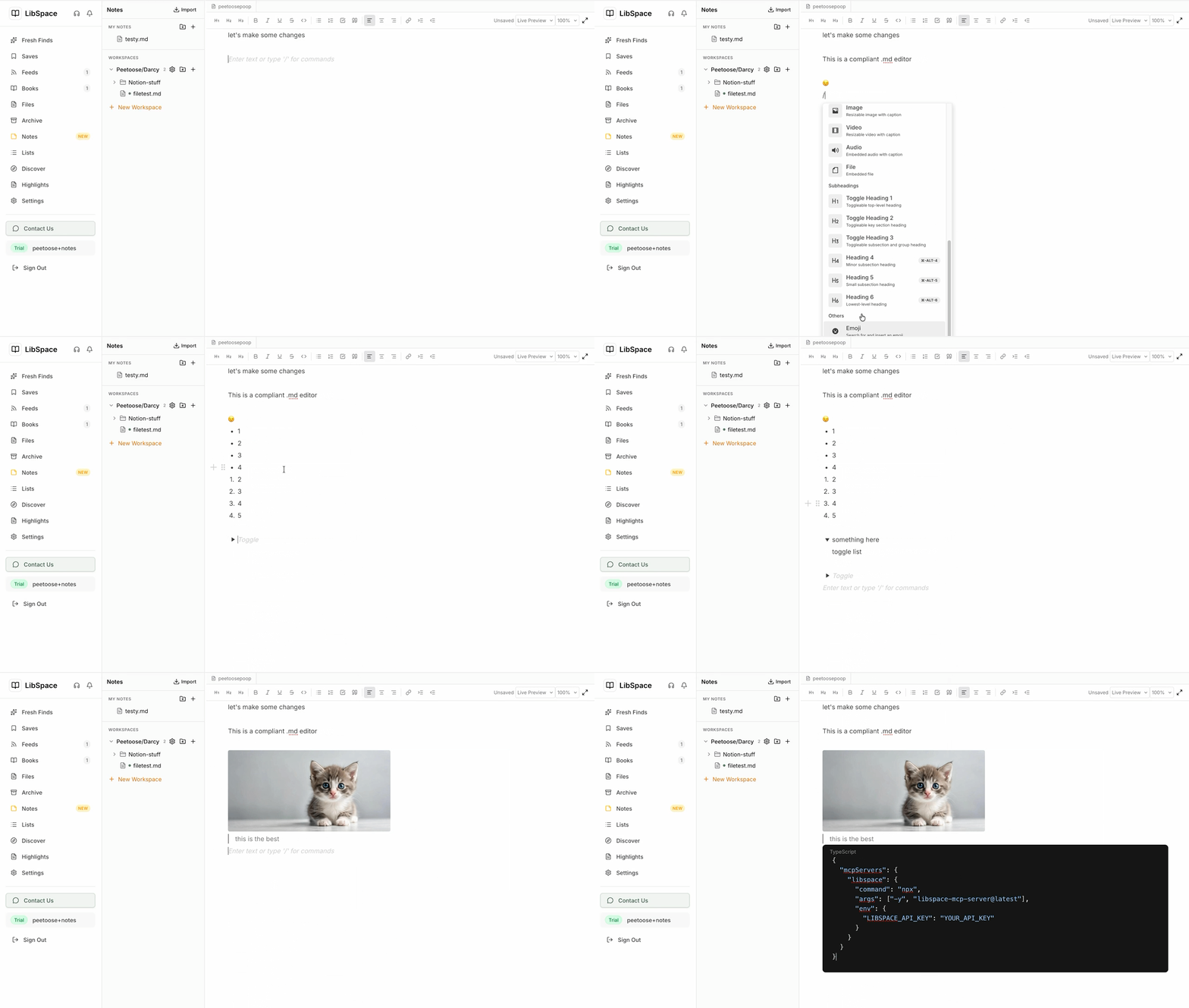
LibSpace Notes isn't a text box with a save button. It's a full markdown editor with syntax-highlighted code blocks (20 languages via Shiki), embedded images and media, drag-and-drop file uploads, and three view modes: live preview, source, and reading.
Open multiple files in tabs and switch between them instantly. Auto-save keeps your work safe. Resize the sidebar, go full-screen, zoom in or out. Dark mode works properly — not just inverted colors.
Workspaces for your team
Create shared workspaces and invite collaborators by email. If they already have a LibSpace account, they're added instantly. If not, they get an invite email and join automatically when they sign up.
Everyone sees changes from teammates in real-time. Organize with folders, sort by name or date, and search across everything with full-text search.
Your LLM writes here too
This is the part that changes how you work.
Connect Claude Code, Cursor, Windsurf, or any MCP-compatible tool. Your AI gets full access to your notes — and now your entire library. One config block:
{
  "mcpServers": {
    "libspace": {
      "command": "npx",
      "args": ["-y", "libspace-mcp-server@latest"],
      "env": {
        "LIBSPACE_API_KEY": "YOUR_API_KEY"
      }
    }
  }
}
Generate your API key at Settings > Authenticate. Add the block to ~/.claude.json. Restart your tool. Done.
Your LLM can now save research into shared folders, read notes that teammates wrote, search across your library, check what changed since your last session, and organize everything into workspaces.
Import what you already have
Moving from Obsidian? Select your vault folder and LibSpace imports every .md file with folder structure preserved. Images, videos, and other embedded files are automatically uploaded and references rewritten.
Moving from Notion? Connect your Notion account, pick the pages you want, and they're converted to markdown and saved.
No lock-in going the other way either. Download any note as .md or any folder as .zip.
Markdown is the source of truth
No proprietary formats. Your notes are stored as markdown — the same format your LLM naturally reads and writes. What you type is what's stored. What your LLM saves is what you see.
This matters because it means your notes are portable, searchable, version-control-friendly, and readable by every tool in your stack.
MCP Server v1.2.0: 24 tools across your entire library
The MCP server started with 10 tools for notes. It now has 24 tools covering everything in LibSpace.
Notes and Workspaces (10 tools)
list_workspaces save_note read_note list_notes search_notes delete_note list_folders create_folder get_recent_changes and all accept an optional workspace parameter.
Library (7 tools)
search_library searches across all your saves, books, and files. list_saves filters by folder, tags, read status. get_article reads full article content. tag_article and archive_article for organization. get_reading_stats for the numbers.
RSS Feeds (2 tools)
list_feeds shows subscriptions. subscribe_feed adds new ones by URL.
Reading Lists (4 tools)
list_reading_lists get_reading_list create_reading_list add_to_reading_list — your LLM can curate collections.
Highlights (2 tools)
get_highlights for any article. list_annotated_books to browse everything you've marked up.
Who is this for?
Teams using AI daily. Your LLM generates meeting notes, research summaries, and technical docs. LibSpace Notes is where all of that lives — accessible to your whole team, not trapped in individual chat logs.
Obsidian and Notion users who want collaboration. Keep writing in markdown. Import your vault. Share specific folders with your team. Let your LLM contribute alongside you.
Developers connecting AI to their workflow. 24 MCP tools to read, write, and search programmatically. Save context between sessions. Build automations. Let your AI maintain its own knowledge base.
Get started
- Open Notes in LibSpace
- Create a workspace and invite your team
- Connect your LLM at Settings > Authenticate
- Start writing — together
Notes is available now on all LibSpace plans.
Darcy Reno
Founder of LibSpace. 25+ years in technology leadership across the media and entertainment industry — including roles at Constellation Software, Electronic Arts, and Technicolor, and working alongside studios like DreamWorks Animation, Disney, and Nickelodeon. A passionate reader, Darcy built LibSpace to bridge the gap between online content and e-readers, with a focus on long-form articles, research, and journalism.
Try LibSpace Free for 30 Days
Send articles, documents, and web pages to your e-reader in seconds. No credit card required.